Error generating session ID. Please try again later
A suggestion, bug you found, other comments...
{{ bugReportMessage.length }} / 7500
Thank you for your feedback
Welcome to Wizard-ASM
The Spell Slinging Programming Battle Game
Sign up below to get started
Game is in pre-alpha
Tutorial
Please read below to understand the game
Wizard-ASM is meant to get you thinking like a programmer
Plan ahead
In most games you would control your character in real time, moving out of the way when you see an attack coming at you, or shooting a fireball at your enemy when you
see them in the open. However, in Wizard-ASM everything is planned before the battle even starts. Every action, every reaction must be considered before the battle
even starts.
You must be specific
This is all determined through the battle program.
The battle program is the meat of the game. It is a list of instructions that your wizard will follow exactly.
This is supposed to mirror programming in real life, a programmer writes a program that a computer will execute exactly as its written.
You are the programmer and the wizard is the computer. Computers (and wizards) will only do exactly as they're told. You have to be extremely specific if you want
them to do what you want. If you want your wizard to shoot lightning, you have to tell it which direction. If you want your wizard to teleport,
you have to tell it exactly where to teleport to.
Don't let your wizard run out of instructions
You also can't just let the wizard decide what to do if it runs out of instructions. You must ensure that your
battle program loops in some way (you can learn how in the create tab) so that the wizard will always have an instruction from you to follow. Should the wizard run
out of instructions, it will die. This is known as 'PTRDEATH'
Battle Program Example Step by Step
Battle Program in Detail
This simple program to the right will shoot lightning in 4 directions and repeat while keeping the right amount of mana (your mana starts at 100)
The text in grey would not be part of an actual battle program
All instructions and their arguments are explained in detail in the 'Create' tab
Example Program
RECHARGE 100 <- Recharge 100 mana to get mana to 200
LIGHTNING N <- Shoot lightning north
LIGHTNING S <- Shoot lightning south
RECHARGE 200 <- Recharge 200 mana
LIGHTNING E <- Shoot lightning east
LIGHTNING W <- Shoot lightning west
RECHARGE 200 <- Recharge 200 mana
JUMP -6 <- Jump back up to the 'LIGHTNING N'
The Arena
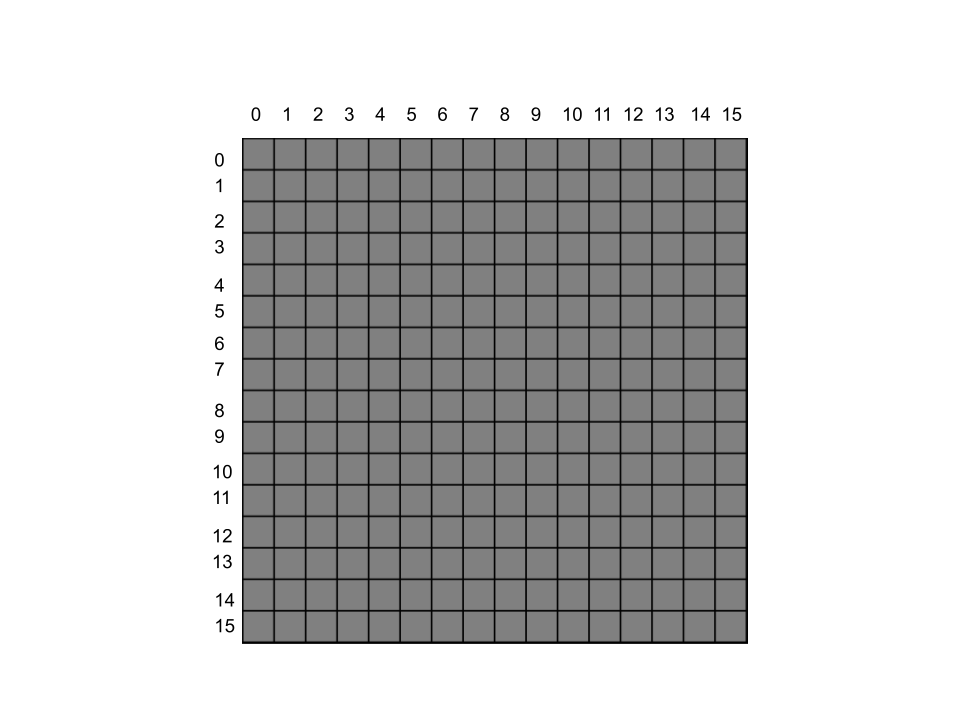
One Big 16x16 Square
The game takes place in a 16x16 grid where you and your opponent will receive random spawns
The arena rows and columns start at the top left and end at the bottom right
You will also notice that rows and columns start at zero, not one. Thats because computers in real life start counting at zero
TL;DR
Eliminate the enemy before they eliminate you
Start at 100 mana
Plan all your spells and actions by making a battle program
Make sure your battle program loops in some way or you will die from 'PTRDEATH'
Manage your mana wisely or you will die from too much or not enough mana
The game will end if nobody dies after 2000 turns
Log in or register, then head over to the 'Create' tab to learn about the spells available to you
Get Started Today!
Fret not! For your spells are all you need. With them you can summon lava, shoot lightning, teleport, and magically deduce the location of your opponent. Rely on your spells and you will be a victor in The Arena.
Create a Battle Program
After creating your program, head over to the 'Replays' tab to duel another player
Saved program successfully
{{ msg }}
Scroll Down For Instructions
Game Instructions In Detail
Example Template
This is how all following instructions will be structured
Instruction Name argument 1 argument 2 ...
The name of the instruction will be listed, followed by a number of arguments that must be provided. Arguments take the form of a number or a single letter (or two).
Mana Cost: X
Spells and Actions
Magma arg1 arg2
Summons an explosion of magma in a 3x3 square centered on target location
Arg 1: A number (0-15); The row you want to target
Arg 2: A number (0-15); The column you want to target
Alternatively, you can put -1 for both arguments to target a random location
Mana Cost: 20
Example Usage: MAGMA 1 5
Acid arg1 arg2
Summons a puddle of acid on target location. The puddle stays on the ground indefinitely
Arg 1: A number (0-15); The row you want to target
Arg 2: A number (0-15); The column you want to target
Alternatively, you can put -1 for both arguments to target a random location
Mana Cost: 10
Example Usage: ACID 0 3
Move arg1
Move a single tile in the chosen direction
Arg 1: Cardinal directions represented by the following: N NE NW S SE SW E W
Mana Cost: 0
Example Usage: MOVE NE
Teleport arg1 arg2
Teleport to target location
Arg 1: A number (0-15); The row you want to target
Arg 2: A number (0-15); The column you want to target
Alternatively, you can put -1 for both arguments to teleport to a random location
Mana Cost: 100
Example Usage: TELEPORT 5 9
Shield arg1
Apply a magical shield to protect from certain damage types
Arg 1: 1 for fire; 2 for lightning; 3 for acid
Mana Cost: 10
Example Usage: SHIELD 2
Wait
Simply wait and do nothing
Mana Cost: 0
Example Usage: WAIT
Recharge arg1
Recharge your mana by the chosen amount
Arg 1: A number (0-200)
Running out of mana while trying to cast a spell will result in a loss, however having too much mana will result in a loss due to mana overcharge. Think wisely about how much mana you actually need!
Mana Cost: 0
Example Usage: RECHARGE 200
Divination arg1
Hone in on the location of the enemy player
Arg 1: a number (0-5)
0 will give an exact location of the enemy, while each subsequent number will give a location with a margin of error equal to that number
Divination will save the coordinates (row, column) in your crystal ball, which you can access with the CRYSTAL instruction
Mana Cost: 200 at level 0 190 at level 1 180 at level 2 ... 150 at level 5
Example Usage: DIVINATION 0
Crystal arg1
Use on an instruction that takes a row, column coordinates such as MAGMA
Crystal will take the numbers saved in your crystal ball and overwrite the arguments of the instruction that arg1 points to
Arg 1: a number pointing to the instruction you want to modify
Mana Cost: 0
Example Usage:
Lets say your crystal ball contains: 5, 8 and you have the following battle program:
MAGMA 0 0 CRYSTAL -1
After the CRYSTAL instruction is run, MAGMA will now look like this: MAGMA 5 8
Lightning arg1
Shoot lightning in a straight line in the chosen direction
Arg 1: Cardinal directions represented by the following: N NE NW S SE SW E W
Mana Cost: 100
Example Usage: LIGHTNING NE
Logical Instructions
Sloop arg1
Start a loop that will run a specified number of times
Arg 1: A number
NOTE! Nested loops using Sloop and Eloop is not currently supported
Mana Cost: 0
Example Usage: SLOOP 10 This will signify the start of a loop that will run 10 times
Eloop
Paired with an Sloop instruction. This will specify the end of your loop and will signal the program reader to go back up to your Sloop instruction
Mana Cost: 0
Example Usage: ELOOP
Jump arg1
This will tell the program reader to go back or forward a specified number of instructions in your program
Arg 1: A number (positive or negative), the amount of instructions you would like to jump forward or backward
Mana Cost: 0
Example Usage:
MAGMA 0 0
RECHARGE 20
JUMP -2
`JUMP -2` tells the game to go back up to the MAGMA instruction which is two positions above the JUMP instruction in the battle program
Jump is essential for a successful battle program. If you run out of instructions the game will try to read a non-existant instruction and you will die.
This is know as a PTRDEATH. If you see this in your death messages it means you ran out of instructions to give the game
Use jump to ensure the game doesn't run out of instructions to execute from your program
Premium Spells
PowerWordKill™
Instantly kill your opponent
Mana Cost: 1
$9.99
Thank you for your purchase. Please use this power responsibly.
Wish™
Get anything you wish for
Mana Cost: 200
$15.99
Thank you for your purchase. Please use this power responsibly.